
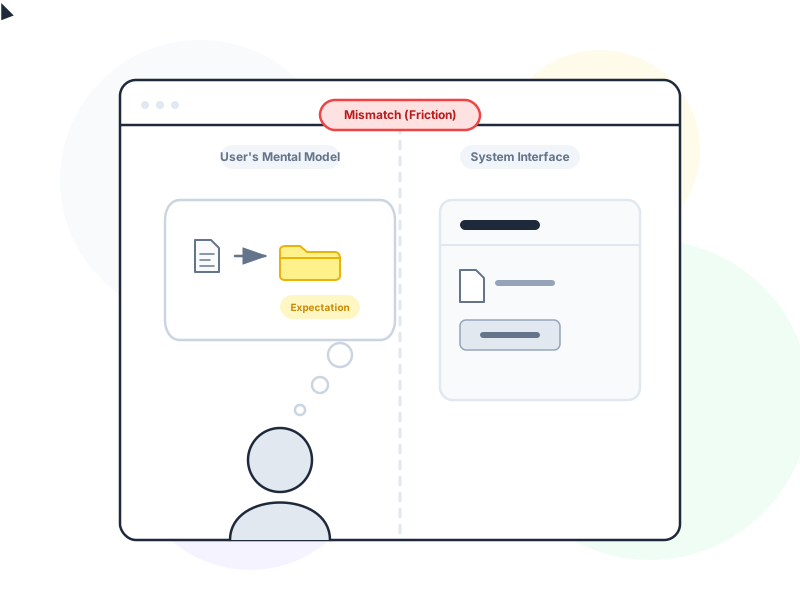
A mental model is the internal picture a user has of how a system works. It shapes what they expect to happen when they tap a button, look for a setting, or navigate between sections. When your interface matches users’ mental models, everything feels intuitive. When it doesn’t, even simple tasks become confusing.
Why It Matters
Users don’t arrive at your product as blank slates. They bring expectations built from every other app, website, and digital tool they’ve ever used. A shopping cart icon means “my selected items.” A magnifying glass means “search.” Swiping left means “delete” or “dismiss.” These aren’t rules you invented – they’re mental models users carry with them.
When your product aligns with these expectations, users feel instantly comfortable. They know where to look, what to click, and how to recover from mistakes. The interface feels familiar even on first use. When your product breaks from these models without clear reason, users feel lost. They click the wrong things, look in the wrong places, and blame themselves for not “getting it.”
The gap between how users think your system works and how it actually works is where most usability problems live. Closing that gap – through research, testing, and design decisions – is one of the most impactful things a UX designer can do.
How It Works / Types
Mental models operate at several levels in design:
System Image vs. User Model
Don Norman describes three parts of the equation. The designer has a conceptual model – how they intend the system to work. The user has a mental model – how they believe it works. And the product itself presents a system image – what the user actually sees and interacts with. Problems arise when the system image doesn’t clearly communicate the designer’s conceptual model, leaving users to guess.
Learned Models
Users build mental models from past experience. Someone who has used Gmail for years expects email to work a certain way – labels, threads, starring, archive vs. delete. A competing email app that uses fundamentally different concepts (tags instead of labels, channels instead of folders) forces users to abandon their learned model and build a new one. That’s expensive cognitive effort most users aren’t willing to invest.
Cultural and Domain Models
Mental models aren’t universal. A financial analyst’s mental model of a “dashboard” includes charts, KPIs, and drill-down capabilities. A social media user’s “dashboard” means a feed of posts. Same word, very different expectations. Understanding your users’ domain-specific models is critical for designing interfaces that feel natural to them, not just to your team.
Real-World Example
Consider the “trash” or “recycle bin” on desktop operating systems. Users have a strong mental model of how physical trash works: you throw something away, it sits in the bin until you empty it, and you can retrieve it before that happens. Desktop operating systems mirror this model perfectly – deleted files go to a recoverable location, stay there until explicitly emptied, and can be restored.
Now imagine an app that permanently deletes files the moment you tap “Delete” – no trash, no undo, no recovery. The functionality is technically simpler, but it violates a deeply held mental model. Users who expect a safety net will lose files and lose trust in the product. The mental model mismatch turns a design decision into a usability disaster.
How to Apply
-
Research before you design. Run a card sorting exercise to discover how users naturally group and label concepts. Conduct interviews to understand how users think about the problem your product solves. Don’t assume your team’s mental model matches your users’ model – verify it.
-
Follow established conventions unless you have a strong reason not to. Navigation at the top or left. Settings behind a gear icon. Confirmation before destructive actions. These patterns exist because users expect them. Every deviation from convention requires users to build a new mental model, adding cognitive load.
-
Use familiar metaphors. A “shopping cart,” a “bookmark,” a “folder” – these metaphors work because users already have mental models for their physical equivalents. When introducing a new concept, anchor it to something users already understand. “Think of Channels like group text threads” is instantly clearer than a feature tour.
-
Make the system image match the conceptual model. If your backend treats “archive” and “delete” as completely different operations, make sure the interface communicates that distinction visually and spatially. When the visible design accurately reflects how the system works, users form correct mental models naturally.
-
Test for model mismatches with real users. Ask users to complete tasks and think aloud. Listen for phrases like “I expected…” or “I thought this would…” – these reveal gaps between their mental model and your system image. Usability testing is the most reliable way to discover mismatches before launch.
Common Mistakes
Designing based on the team’s mental model. Your team knows how the product works internally – database relationships, API calls, permission hierarchies. Users don’t. When information architecture mirrors backend structure instead of user thinking, navigation becomes a puzzle. Always prioritize the user’s model over the developer’s model.
Changing established patterns without user education. Redesigning a familiar interface forces users to rebuild their mental model. This can be worth it – but only with clear transition support. Abrupt changes without guidance (tooltips, onboarding, changelog) leave users feeling disoriented and frustrated.
Understanding users’ mental models goes beyond personas. Jobs to Be Done research uncovers the situational triggers that shape how users approach a task – often revealing mental model differences that demographic data misses entirely. Aligning interface behavior with correct mental models is also a core responsibility of interaction design, which governs how every system response either confirms or challenges what users expect.
Assuming one mental model fits all users. Beginners and experts have different mental models of the same product. A first-time user expects hand-holding; a power user expects shortcuts. Design for the primary user persona but provide flexibility for others – this usually means a simple default path with discoverable advanced options.
Further Reading
- Mental Models and User Experience Design – Nielsen Norman Group’s overview of how mental models shape user behavior and interface expectations
- What are Mental Models? – Interaction Design Foundation’s guide to mental model theory and its application in UX design